
Short answer
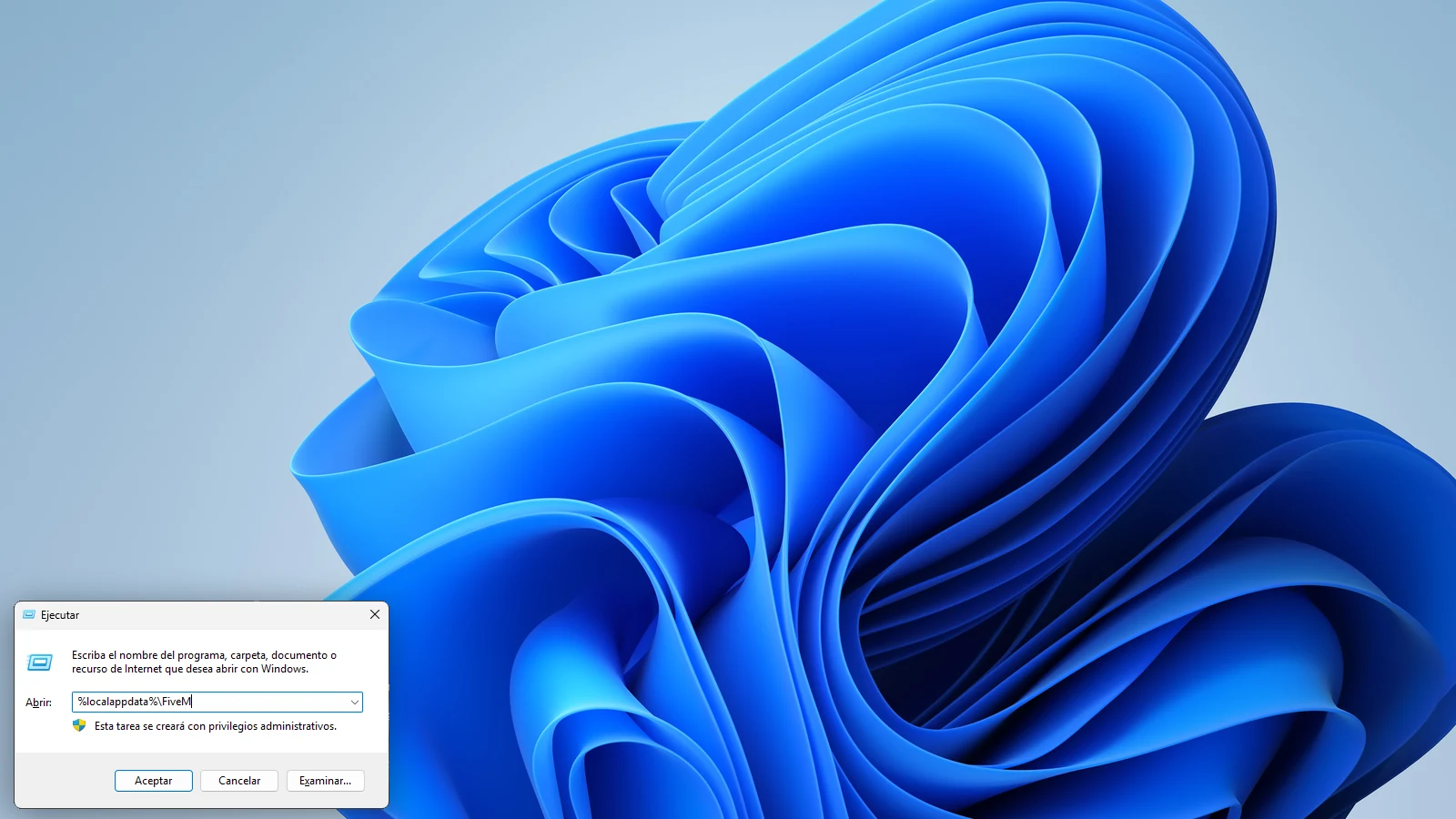
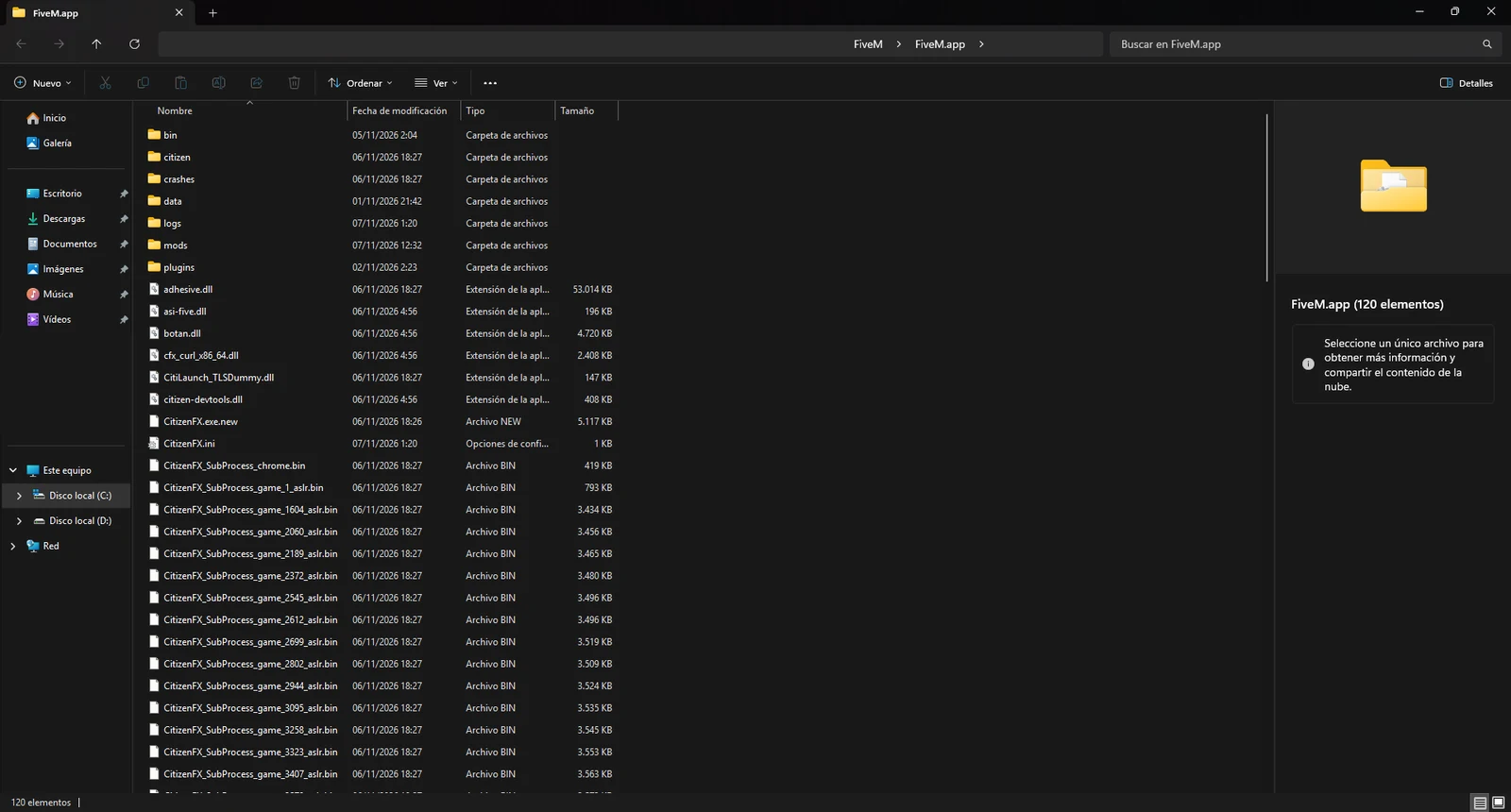
The FiveM folder is at %localappdata%\FiveM. To open it, press Win+R, type %localappdata%\FiveM and press Enter. Inside is FiveM.app, which Windows may show as “FiveM Application Data”: that’s where the citizen folder is and, if they exist, mods and plugins.
All of this is for FiveM Legacy. Where FiveM Enhanced keeps its files isn’t confirmed; we cover that at the end.
How to open the FiveM folder
The folder is inside AppData, which Windows hides by default. That’s why you can’t find it by clicking around. The fastest shortcut:
- Press the Windows key and R at the same time. The Run window opens.
- Type
%localappdata%\FiveM. - Press Enter. The FiveM folder opens.
- Go into
FiveM.app(or “FiveM Application Data”, depending on how your Windows shows it). - Optional: right-click
FiveM.appand choose Pin to Quick access. That way it’s always handy in File Explorer.
What if it’s not there? That’s the normal path. But if, back in the day, you ran the FiveM installer from an empty folder, FiveM got installed in that folder. In that case, find the FiveM shortcut, right-click it and choose Open file location.
What’s inside FiveM.app
This is what matters if you’re going to install mods. Next to each item we say where the info comes from, because not everything is in the Cfx.re documentation.
| Folder or file | What it’s for | Source |
|---|---|---|
citizen |
FiveM’s own files. This is where citizens go: citizen\common\data and its timecycle subfolder. |
Community guides |
mods |
.rpf packages, like graphics mods. It’s where weapon skins usually go. Sound packs don’t work here: they go in the GTA V folder. |
Most-cited answer on the Cfx.re forum, not official |
plugins |
.asi mods. If it doesn’t exist, you can create it. Servers may not allow them, and the documentation warns that you use them at your own risk. |
Cfx.re documentation |
CitizenFX.ini |
Client settings, like the update channel. | Cfx.re documentation |
caches.xml |
An internal FiveM file. Current FiveM usually doesn’t have it anymore; if yours does, deleting it is the fix the documentation gives for missing component errors. | Cfx.re documentation |
data |
Download caches from servers. | Third-party guides |
Don’t touch CitizenFX.ini unless you know what you’re changing. You don’t need it to install our mods.
FiveM mods folder or plugins folder: which one to use
An .rpf file is a package with game textures, models or sounds. It’s the format weapon skins usually come in, and they go in the mods folder. Sound packs are .rpf files too, but they don’t work in mods: they go in the GTA V folder, as we explain in how to change gun sounds.
This is the question that comes up the most, and the short answer is that there’s no official page that clears it up. Cfx.re documents plugins, but doesn’t explain the mods folder. What the community uses, and what we do, is this:
.rpffile (textures, models): goes inmods. If it’s a sound pack, it doesn’t: it goes in the GTA V folder..asifile (scripts that load with the game): goes inplugins.- Loose citizen files (
.dat,.xmland similar): go incitizen, at the path the README says.
To know what you have, look at the file extension. If Windows doesn’t show it:
- Open any folder.
- On Windows 11, go to View, then Show, and check File name extensions. On Windows 10, go to the View tab and check the same box.
- Now you’ll see the full file names, for example
pack.rpf.
If mods doesn’t exist in your FiveM.app, you normally just create it yourself: right-click, New, Folder, and name it mods, in lowercase.
Every pack on our Discord comes with its README (the LEEME file) with the exact path. If the README says one thing and some guide online says another, go with the README: it was made for that file.
How to put a mod in its folder
- Close FiveM completely, including from the icons next to the clock if it’s still there.
- Back up whatever you’re going to touch. If it’s a citizen, copy the whole
citizenfolder somewhere else. - Check the extension and the README to know which folder it goes in.
- Copy the file into
mods,pluginsorcitizen. - Open FiveM and test it on a server that allows mods.
The step-by-step guides: how to install a citizen, how to install weapon skins and how to change weapon sounds.
If a mod won’t load or FiveM gives you trouble
The mod doesn’t show and there’s no error
Most likely it’s the server’s pure mode: modified files in the FiveM folder get ignored without any warning. Try it on another server. We explain it in the pure mode guide.
FiveM warns you about a modified file
On pure mode servers, that warning shows up when files in your GTA V install have been changed, not files in FiveM. The message tells you which file it is: restore it to its original state. Your mods go in the FiveM folder; they won’t show on that server, but the warning goes away.
How do I fix the missing components error?
If it shows up when you open FiveM, the Cfx.re documentation says to delete caches.xml:
- Close FiveM.
- Open
%localappdata%\FiveM\FiveM.app. - If there’s a
caches.xmlfile, delete it. Current FiveM usually doesn’t have it anymore. - Open FiveM again.
A citizen that used to work stopped showing
FiveM updates can overwrite the files in citizen. Install it again.
How do I clear the FiveM cache?
If you get stutters or weird loading when joining a server, some third-party guides recommend emptying the caches in FiveM.app\data (cache, server-cache and server-cache-priv) while keeping the game subfolders. It’s not a step from the Cfx.re documentation. If you do it, do it with FiveM closed, and expect your next join to take longer, because it downloads everything again.
You don’t know which mod is causing problems
Move everything in mods to a folder on your desktop, check that FiveM runs fine, and put them back one at a time.
Quick questions
Where is the FiveM Enhanced folder?
We haven’t found anything published by Cfx.re about it. One forum user says the settings for FiveM for GTAV Enhanced are in %appdata%\FiveM for GTAV Enhanced, but we haven’t seen it confirmed. Either way, on Enhanced pure mode is always on and you can’t use graphics mods while early access lasts. It’s all in FiveM Legacy or Enhanced.
Can other players see what I put in the mods folder?
No. The textures and sounds you install on your client are only seen and heard by you. Others see the normal weapon, unless the server adds it for everyone.
Can I get banned for having mods in that folder?
There are no documented global bans for organizing folders or using visual mods; if a server bans mods, respect that. More in the FAQ.
What mods are there to put in it?
Citizens with an image in the sky, weapon skins with real 3D, BloodFX and sounds. They’re sorted by category in citizen, weapon skins, BloodFX and sounds. To download them or ask anything, join the Discord.
Stuck? On the Discord we help you install it and the files are ready for you.
Join the DiscordMore in FAQ · All guides