
Short answer
To change gun sounds in FiveM, install a sound pack. It usually comes with two .rpf files, WEAPONS_PLAYER.rpf and RESIDENT.rpf, which replace the originals in your GTA V folder, inside x64\audio\sfx. They don’t work in FiveM’s mods folder. A pack can change gunshots, the headshot or kill sound, reloads and footsteps. Only you hear it, and with pure mode level 1, audio files usually get through.
What you can change
- Gunshots. The sound each weapon makes when it fires.
- Headshot or kill sound. What plays when you land a headshot or get a kill. You’ll often see it called a killsound or headshot sound.
- Reloads. The sound when you swap mags.
- Footsteps. A footstep sound that’s different from the original.
Our packs are custom sounds. You’ll find them all on the FiveM gun sounds page.
Before you start
- Use FiveM Legacy. Our packs are made for FiveM Legacy. On FiveM Enhanced, pure mode is always on and can’t be turned off. If you don’t know which one you have, check the FiveM Legacy vs Enhanced guide.
- Keep the originals. You’re going to replace two GTA V files. First, copy
WEAPONS_PLAYER.rpfandRESIDENT.rpfto a folder outside the game: that’s what lets you go back. - It changes your GTA V, not just FiveM. The new sounds also play in story mode and in GTA Online. Mods aren’t allowed in GTA Online: put the originals back before you go in.
- Read the README. Every pack in the Discord comes with its README (the LEEME file) listing the files it includes and what it changes. If anything in this guide doesn’t match the README, go with the README.
- Check the server rules. Every server decides whether it allows mods.
How to install a sound pack, step by step
- Download the pack from the Discord. If it comes zipped, extract it to your desktop.
- Open the README and check which sounds it changes and which files it includes.
- Close FiveM and GTA V completely, including from the system tray if they’re still running there.
- Open your GTA V folder. In Steam, right-click the GTA V you use with FiveM (Legacy) and choose Manage, then Browse local files. With the Rockstar Games Launcher it’s usually in
C:\Program Files\Rockstar Games\Grand Theft Auto V, and with Epic Games inC:\Program Files\Epic Games\GTAV. - Go into
x64\audio\sfx. That’s whereWEAPONS_PLAYER.rpfandRESIDENT.rpfare, next to other game audio files. - Keep the originals, if you haven’t yet: copy those two files to a folder outside the game.
- Copy the pack’s
.rpffiles intosfxand choose to replace. They need to keep the same names as the originals. If the pack only has one, replace just that one. - Open FiveM, join a server that allows mods and test it: shoot, reload and walk around.
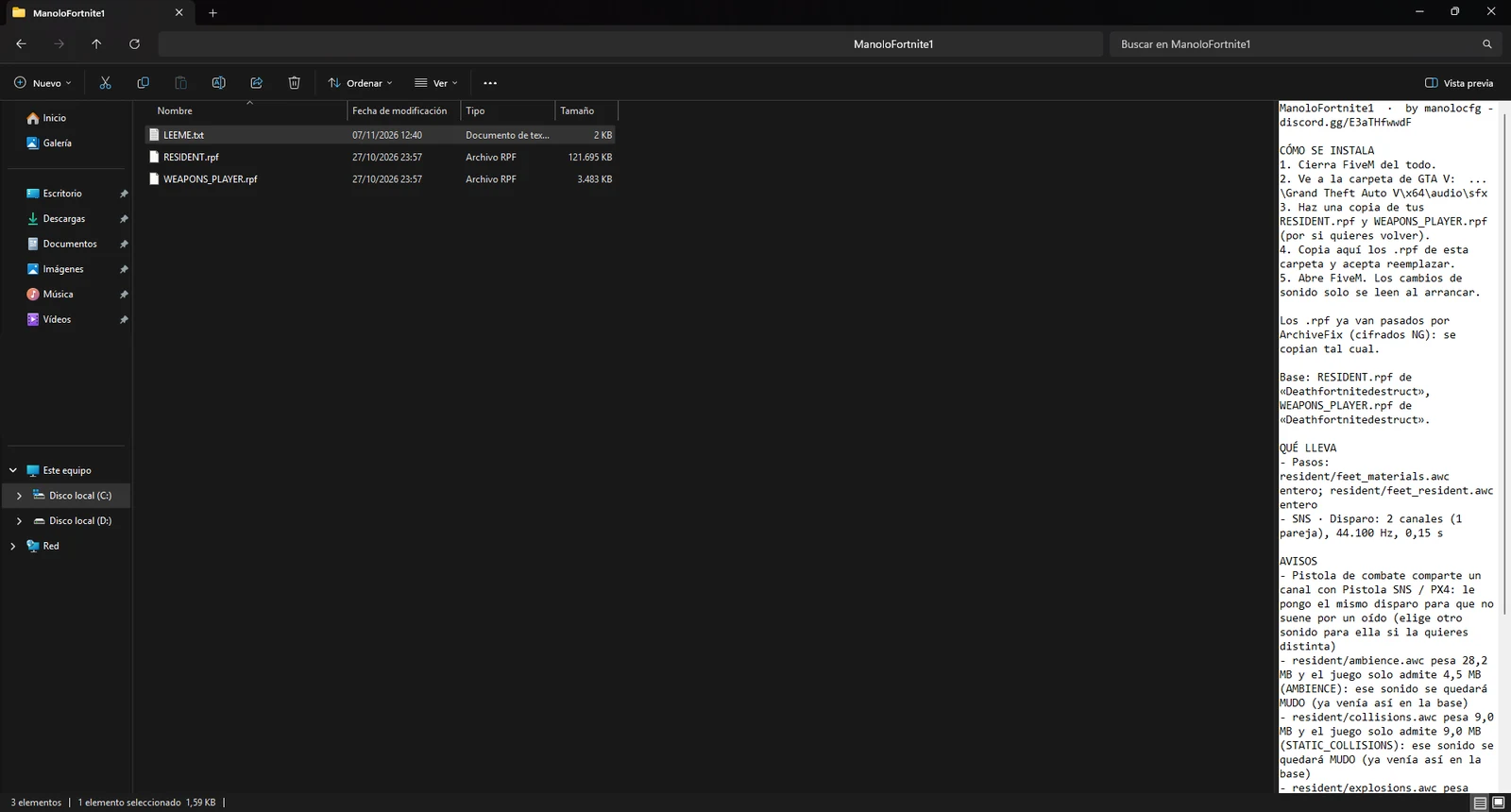
Don’t put them in FiveM’s mods folder: sounds don’t load from there.
Pure mode and sounds
Sounds have it easier here than other mods. According to the FiveM documentation, pure mode level 1 “blocks all modified client files except for audio files and known graphics mods”.
In practice:
| Situation | Does the sound pack load? |
|---|---|
| No pure mode | Yes |
| Pure mode 1 | Usually yes: audio files tend to get through |
| Pure mode 2 | No: all modified files are blocked. To join, put the originals back |
| FiveM Enhanced | Not confirmed: pure mode is always on; ask us before installing |
We don’t know of any official indicator in the server browser that shows which level each server uses. In the FiveM pure mode guide we show you how to find out.
Only you can hear it
A client-side sound pack is only heard by you. Other players hear the game’s normal sounds, unless the server itself sets those sounds for everyone.
It changes how the game sounds on your computer and nothing else. It doesn’t touch damage, fire rate or anything else about the weapon.
Why our sounds are custom
The FiveM Platform License Agreement (PLA) doesn’t allow third-party licensed music or modified in-game voices. That’s why a kill sound made from a clip of a song is a problem, even though plenty of them are going around.
Our packs don’t include anyone’s songs. They’re custom sounds, and we test them in-game before uploading them to the Discord.
How to remove a sound pack
- Close FiveM and GTA V.
- Open your GTA V folder and go into
x64\audio\sfx. - Copy your original
WEAPONS_PLAYER.rpfandRESIDENT.rpfthere and choose to replace. - Open FiveM. The original sounds are back.
If you didn’t keep the originals, use the option to verify the game files in Steam, the Rockstar Games Launcher or Epic Games: it puts back the ones that come with the game.
If you can’t hear the new sounds or can’t join
The server uses pure mode level 2
At level 2 no modified file gets through, audio included. To play on that server, put the originals back, or try another server.
The files aren’t in the right place
Check that the .rpf files are in x64\audio\sfx, inside the folder of the GTA V you use with FiveM, and that they have the same names as the originals: WEAPONS_PLAYER.rpf and RESIDENT.rpf, with no “(1)” or “- Copy” in the name. They don’t work in FiveM’s mods folder.
You copied another pack on top
There can only be one WEAPONS_PLAYER.rpf and one RESIDENT.rpf, so the last pack you copy replaces the one before. If you want the other one back, copy its files again.
The original sounds came back
If you verify the game files, or a GTA V update touches those files, the originals come back. Copy the pack’s files again.
It sounds weird or the game has trouble loading
A badly built audio file can cause problems. Put the originals back and check that the game runs fine. Then download the pack from the Discord again and give it another try.
Still no new sounds
Join the Discord and send us a screenshot of your x64\audio\sfx folder plus the name of the pack. We’ll go through it with you.
Quick questions
Can I use sounds and skins at the same time?
Yes. They change different things and go in different places: sounds in the GTA V folder and skins in FiveM’s mods folder. For skins, there’s the guide to installing weapon skins.
Can I get banned for a sound pack?
In FiveM we don’t know of any global ban for changing sounds; what matters is each server’s rules. We explain it in more detail in the FAQ. Mods aren’t allowed in GTA Online, so put the originals back before you go in.
How much do they cost?
You can get everything for free inside the community, and people there will explain how. If you want a custom sound, join the Discord and ask about prices.
Stuck? On the Discord we help you install it and the files are ready for you.
Join the DiscordMore in Sounds · All guides